







Table of Contents
- The quad is a box
- Punching the hole
- The handoff
- Two problems, one variable
- Light comes from the mouth
- Using it on something real
celestialmaze posted a clip of a Unity scene: a checkered plane with a sphere sunk into it, and when the camera swung round to the side, the whole thing folded up into nothing. Flat quad. No sphere. I wanted to know exactly how much code that took, so I rebuilt it in ShaderToy and then kept going until it was a tunnel instead of a ball.
The finished thing is here, and there's a video walkthrough if you'd rather watch me type it but I realized I'm very bad at video editing/voiceover stuff so the blogged version is easier to extract information from.
The technique has a name, interior mapping, and it's old. People use it for building windows: one quad on a facade, and behind every window there's a room that doesn't exist. The version here is the same idea pointed at a hole.
The quad is a box
Everything in the scene is one box intersection. Here's the half-size:
#define W vec3(1.3,1.3,.02)That Z is the whole thingiy. Two hundredths of a unit. Set it to 1. and you get an actual cube, orbiting like a normal object, and it becomes obvious that nothing clever is happening to the geometry at any point. It's a box. We squashed it.
The intersection is the standard slab test, which packs down to three lines because you can do both slabs at once:
    i=abs(1./d)*W, j=-o/d, q=j-i;
    s=max(max(q.x,q.y),q.z);
    h=min(min((j+i).x,(j+i).y),(j+i).z);
s is the near hit, h is the far one. And the face normal falls out of the same values without a branch anywhere:
n=-sign(d)*step(q.yzx,q)*step(q.zxy,q);Whichever axis won that max is the axis you hit. sign gives you which side of it. Two steps and a multiply, no if.
Punching the hole
Front face, inside a radius, paint it black:
        if(n.z>.5&&dot(p.xy,p.xy)<r*r)
            c=vec3(0);
Note the dot against itself rather than length under r. Same test, and you skip the square root. Small thing, but this shader ends up being mostly small things.
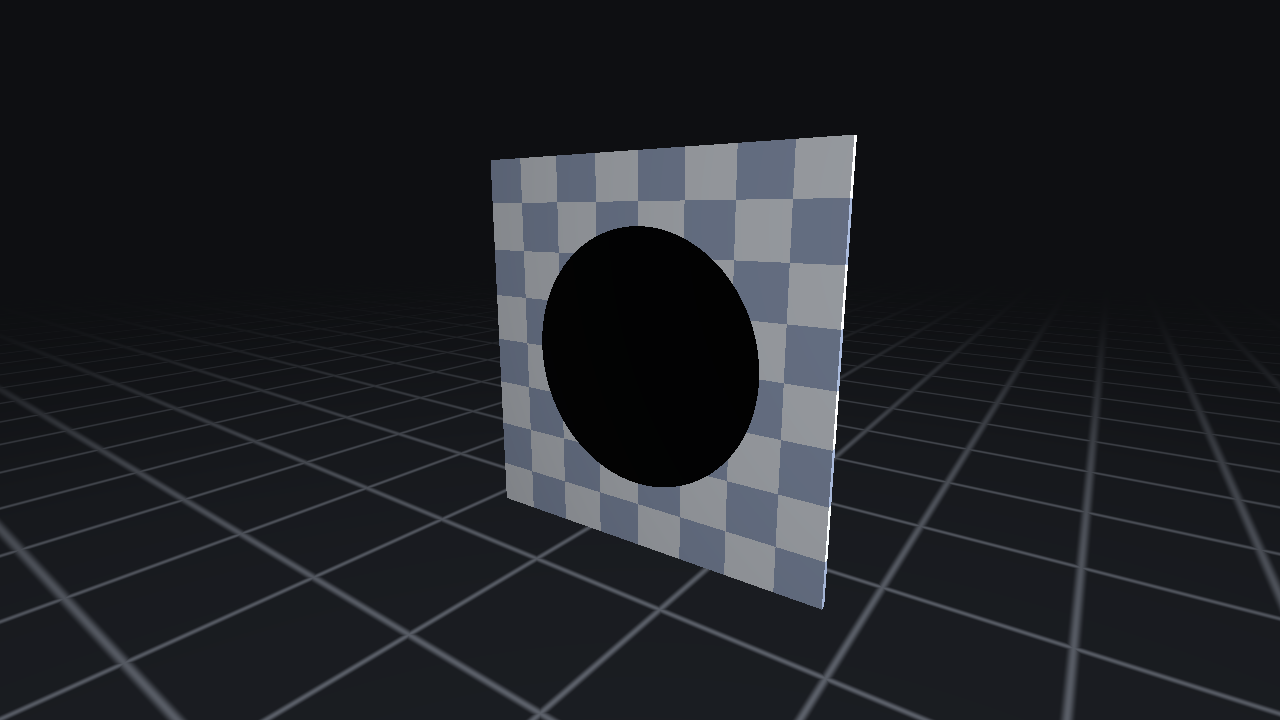
At this point you have a black circle that does absolutely nothing when you orbit. It's a sticker. It's also, structurally, already finished: every remaining line in this post is about what to put inside that if.
 |
|---|
The if fires, nothing fills it. A sticker on a quad: orbit the camera and the black moves with the surface. |
The handoff
Here's the part worth the post.
Instead of shading that circle, you take the point where the ray hit it and treat it as a new ray origin. Same direction, new starting point. The surface catches the ray and lets it keep travelling into a volume that only exists in the shader.
What it travels into is an infinite cylinder, solved in XY only, because Z is unconstrained down a straight bore:
            s=dot(d.xy,d.xy);
            h=dot(p.xy,d.xy);
            s=(-h+sqrt(abs(h*h+s*(r*r-dot(p.xy,p.xy)))))/max(s,1e-6);
            q=p+d*s;
            z=-s*d.z;
Textbook quadratic. The only thing to be careful about is which root you take: you're starting inside the cylinder, so one root is ahead of you and one is behind. Flip that +sqrt to -sqrt and the whole image turns itself inside out, which is a good sanity check and also fun to watch.
z is then just how far down the bore you landed, and that single number does all the remaining work.
The max(s,1e-6) matters more than it looks like it does. Rays aimed straight down the axis have d.xy near zero (the vanishing point, dead centre of the screen), and without the guard you get a NaN pixel sitting right where everyone's looking.
Texture it by angle and depth and you've got a tunnel that parallaxes properly:
            c=mix(vec3(.06,.065,.08),vec3(.85,.88,.94),
                  ck(vec2(atan(q.y,q.x)/3.1416*8.,z*3.)));
Two problems, one variable
That version looks wrong in two specific ways.
First, the checker cells shrink as they run toward infinity, and once they're smaller than a pixel the centre turns into shimmering garbage. No mipmaps here to save you. It's procedural. So fade the pattern out before it gets that small:
                  mix(ck(vec2(atan(q.y,q.x)/3.1416*8.,z*3.)),.5,
                      smoothstep(1.,5.,z))
Past a depth of about five it just becomes flat grey. Hand-rolled mip level, basically, and the noise is gone.
Second, and this is the one that actually sells it: nothing gets darker. The tunnel is lit uniformly forever, which reads as wallpaper rather than distance. One division fixes it:
/exp(z*.25);That's it. That's the infinity. Set the .25 to zero and you're staring at a flat grey disc again; put it back and depth snaps into place. Of everything in this shader, that's the line doing the heaviest lifting per character.
It's also, if you squint, the same trick as the col = col*r at the end of IQ's classic tunnel: his radius and my depth are reciprocals of each other, so darkening by one is darkening by the other.
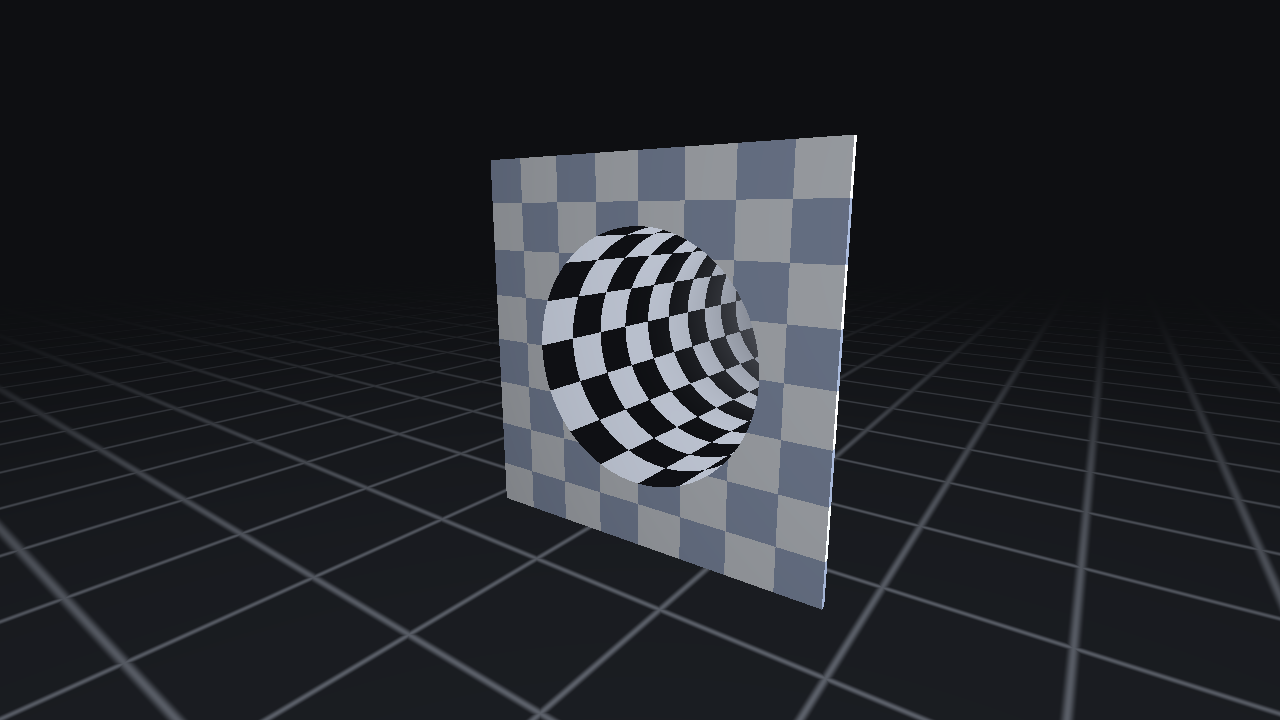 | 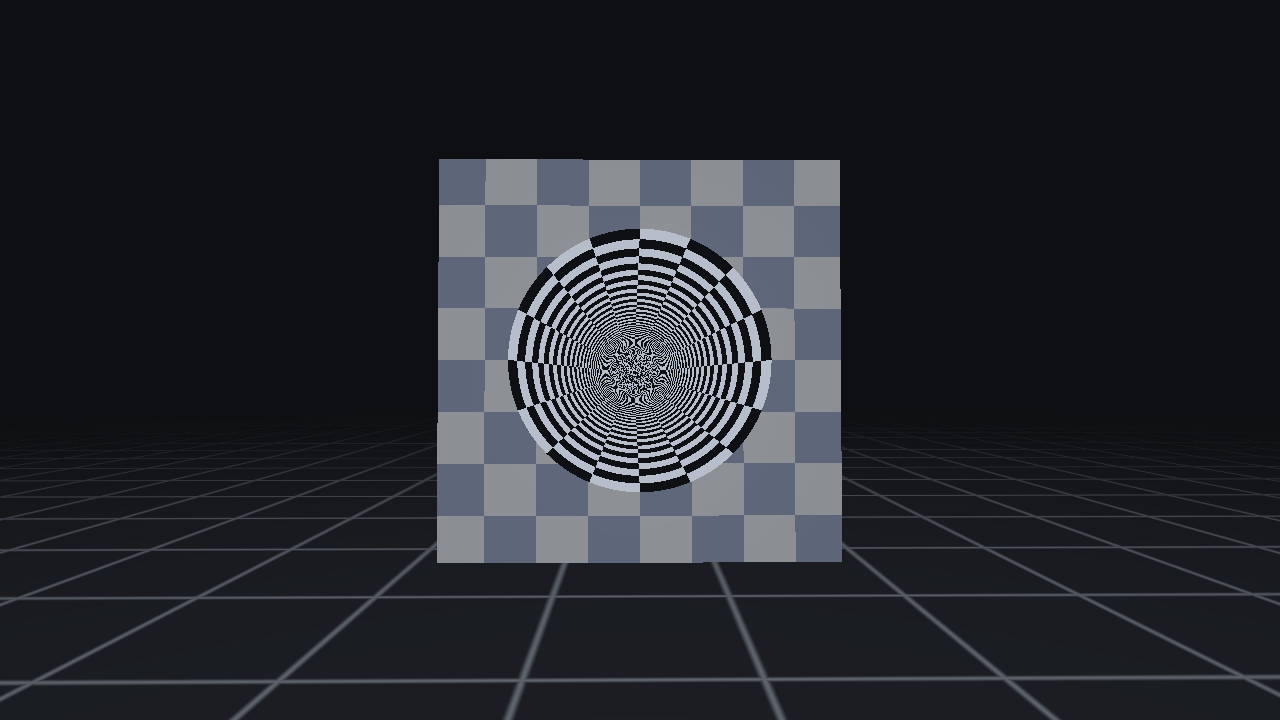 |
|---|---|
| Off-axis, you're looking at the near wall of the bore. | Head-on, you're looking straight down it. Same code, same quad. Only the camera moved. |
Light comes from the mouth
Last thing. A directional light is wrong for a bore: it splits the tube down the middle, half lit and half dead, with a hard seam. Real holes are lit by whatever is outside them. So put the lamp at the opening and fall off with distance:
            n=-normalize(vec3(q.xy,0));
            i=vec3(.3,.45,.8)-q;
            h=length(i), i/=h;
then
*(.05+1.9*(X(n,i)+.55)/1.55/(1.+h*h*1.4))The +.55 there is a wrap term, so the far side of the tube never goes fully black and the shading stays soft. Slightly off-axis lamp position keeps a hint of direction in it rather than looking perfectly symmetric.
Using it on something real
Nothing above is ShaderToy specific. On an actual mesh you rotate the view direction into the surface's own frame and the intersection code is identical, the plane just becomes the UV plane. Any flat face works (windows, vents, shafts), and it's still one draw call no matter how many faces you point it at. Cost is one quadratic per pixel, and it doesn't care whether the tunnel is one unit deep or a thousand, which is the part that makes it worth knowing.
The same three lines work on anything you can hang behind a plane. Here's the tunnel swapped for a tank of water: one refract() before the intersection, a box instead of a cylinder, and the caustics fall out of the refraction Jacobian rather than a scrolling texture.
I put it in a game, so here's what actually changed.
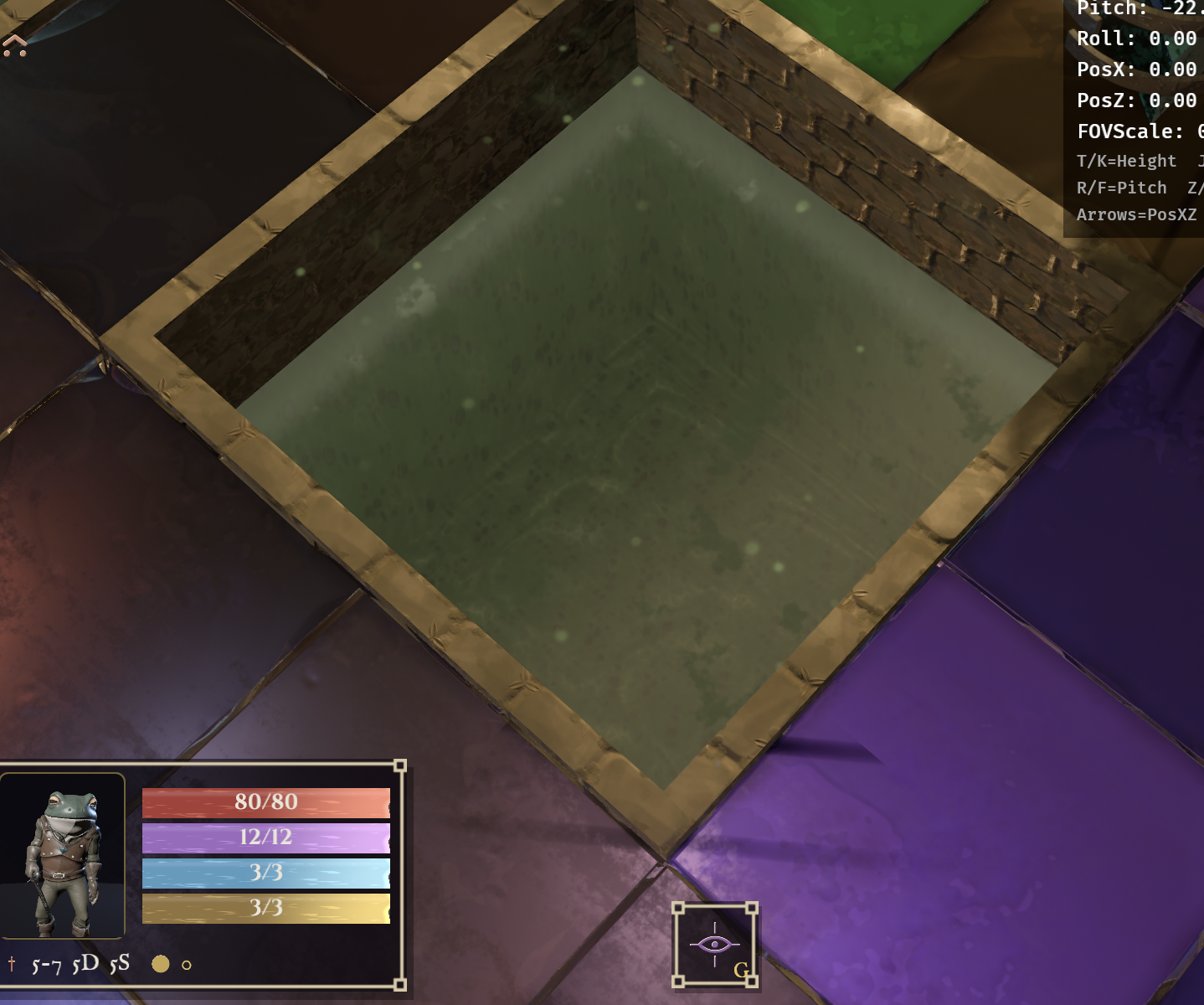
Willcaster is a grid roguelike, and its swamp rooms have pools cut into the floor. The pit is real geometry, brick sides, 0.85 units deep. The water isn't. The water is one tile:
pit_water_mesh: meshes.add(Cuboid::new(1.0, 0.005, 1.0)),Five thousandths of a unit. Same joke as W vec3(1.3,1.3,.02) at the top of this post, four times flatter.
Everything you see through that tile is the slab test. The silt bed, the stones, the submerged walls running away from you. The real pit floor is down there somewhere but the water is opaque, so nobody has ever seen it.
 |
|---|
| The bed and the walls receding toward the far end are the same three lines from the top of this post. The brick above the waterline is the only part that's modelled. |
The ray gets refracted before the intersection runs, which the demo never bothers with. One refract(), costs nothing, and it ties the depth to the wave normal, so the bed swims a little as ripples cross it. That's most of what makes it read as liquid instead of a tinted sheet.
The parallax is a lie too. The camera is locked near top-down, and looking straight down, honest refraction barely displaces anything at all, so the effect is invisible at the only angle anyone plays from. So I cheat:
const PARALLAX_GAIN: f32 = 4.0;
rd = normalize(vec3<f32>(rd.x * PARALLAX_GAIN, rd.y, rd.z * PARALLAX_GAIN));
Horizontal components times four, before the slab test. Physically nonsense, and the difference between a hole and a green rectangle.
Then the part I didn't see coming. Pools aren't rectangles.
The demo has one quad, so the box is just the box. A pool is a lot of tiles, sometimes L-shaped, and every tile runs its own slab test. They all have to agree about where the walls are, or you get a wall drawn through open water.
Giving every tile one box covering the whole pool looks obvious and is wrong. For an L that box is the bounding rectangle, so each arm's inner side sits deep inside it and never gets a wall. Shrinking the box to one tile is wrong the other way: with the gain above the ray is shallow enough that a wall's footprint is wider than a tile, so any tile touching stone goes solid.
So each tile stores four distances instead, found by walking the grid until the water stops. A slab test only ever asks how far the wall is along X and along Z, and that's the answer to exactly that question, whatever shape the pool is.
Which is right about the banks and still wrong as a surface. Neighbouring tiles now march into different boxes, so the depth, the wall fade and the floor/wall split all step at the tile boundary, and an L reads as a hard seam across open water. A per tile box cannot describe a non convex pool consistently; that isn't tuning, it's the representation.
So the march went back to one box per pool, the option I'd just called obvious and wrong, because a notch that the stone bank mostly stands in front of beats a seam that's visible from every angle. The four distances didn't go away, though. They turned out to be answering a different question: not "what box do I march" but "how far is the stone"??, which is what the shore gradient, the shallow lip and the waterline foam are all keyed off. Two values, because they were never one.
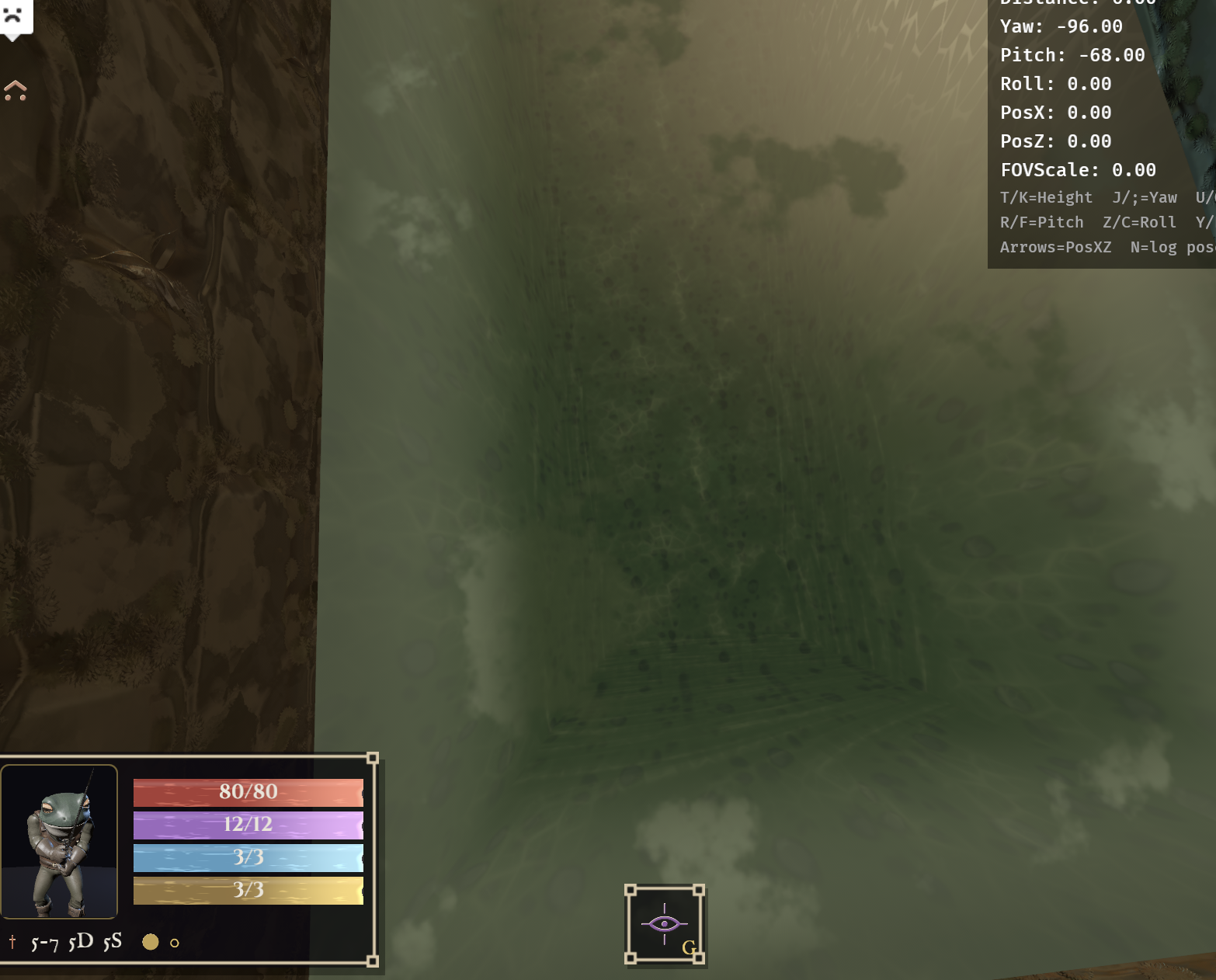 |
|---|
| Straight down into it. Caustics, waves and silt are separate layers on top; the depth under them is the slab test. |
A painted texture would survive most frames in this post. It wouldn't survive that one. The wall and floor junctions slide against each other at different rates as the camera moves, because they're being intersected rather than drawn.
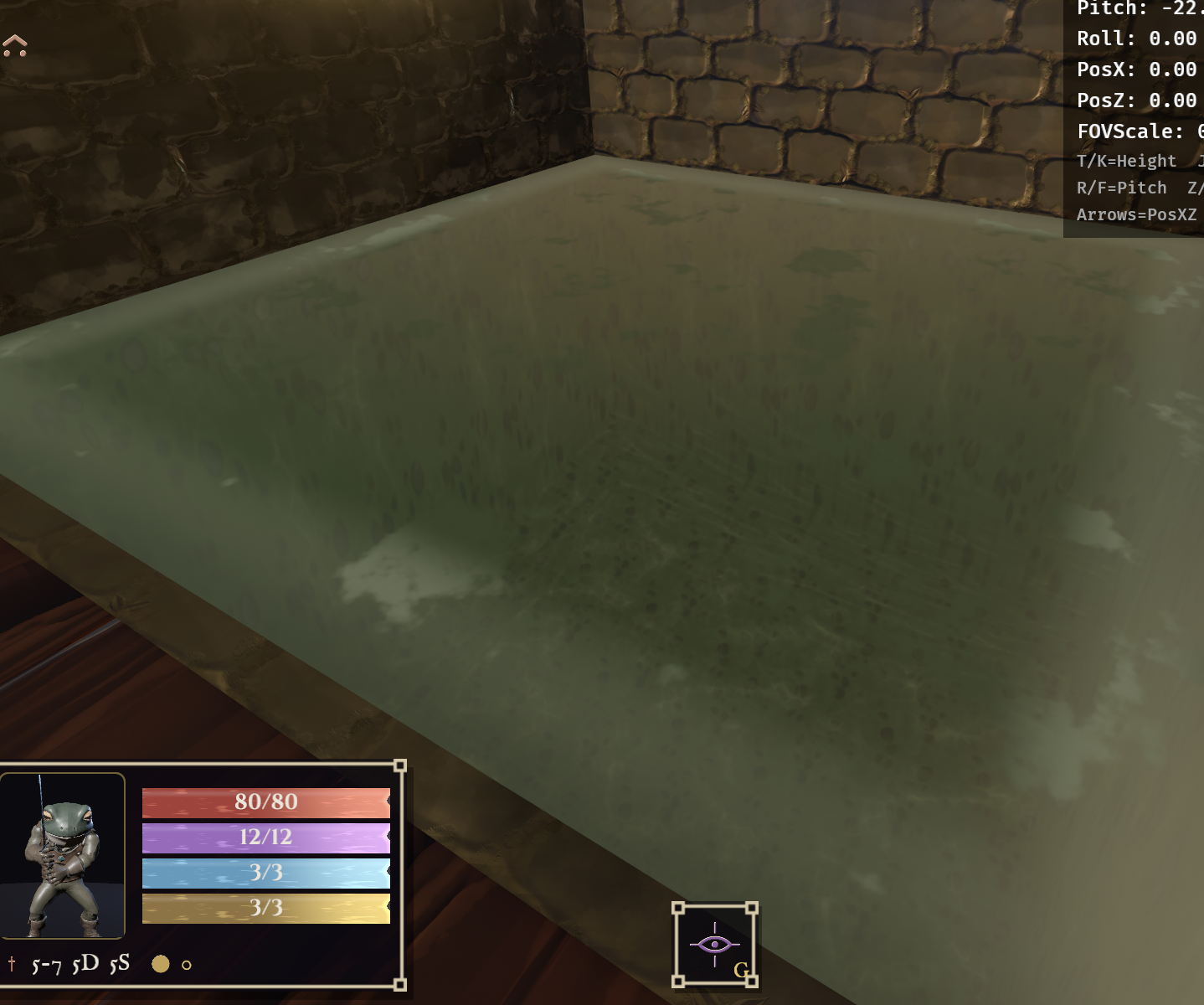
Then drop the camera to the waterline and the mesh gives itself away.
 |
|---|
| Almost edge on. That plate is the entire mesh. |
Everything behind it is still solving. Still one quadratic per pixel, in a frame where you can see exactly how little geometry is doing the work.
Two limits worth being honest about. It's per-face, so only the face you mapped has the hole, and the depth is fake, so nothing intersects or occludes it correctly unless you write depth out yourself. Neither is hard to work around, but you should know about both before you put it in something.
And of course the whole thing collapses if the camera goes edge-on. That's not a bug, that's the same limitation billboards have always had, except here you got real parallax for free right up until the moment you didn't.
For the pool that never comes up, and not because I planned it that way. The camera is locked overhead because it's a grid game. It would have been locked there whether or not the water needed it.
The pool with different angles.
Source is on ShaderToy, fork it and break it. Original inspiration from a clip by @cmzw_.
Cite:
Altun, E. (2026, August 18). A hole that isn't there: faking infinite depth on a flat quad. Retrieved from https://altunenes.github.io/posts/parallax/